 Recur
Recur
Find every subscription hiding in your inbox.
Recur reads your receipt emails on your own computer and builds one list: what you pay for, what it costs a month, what renews next week, and what you’ve stopped using.
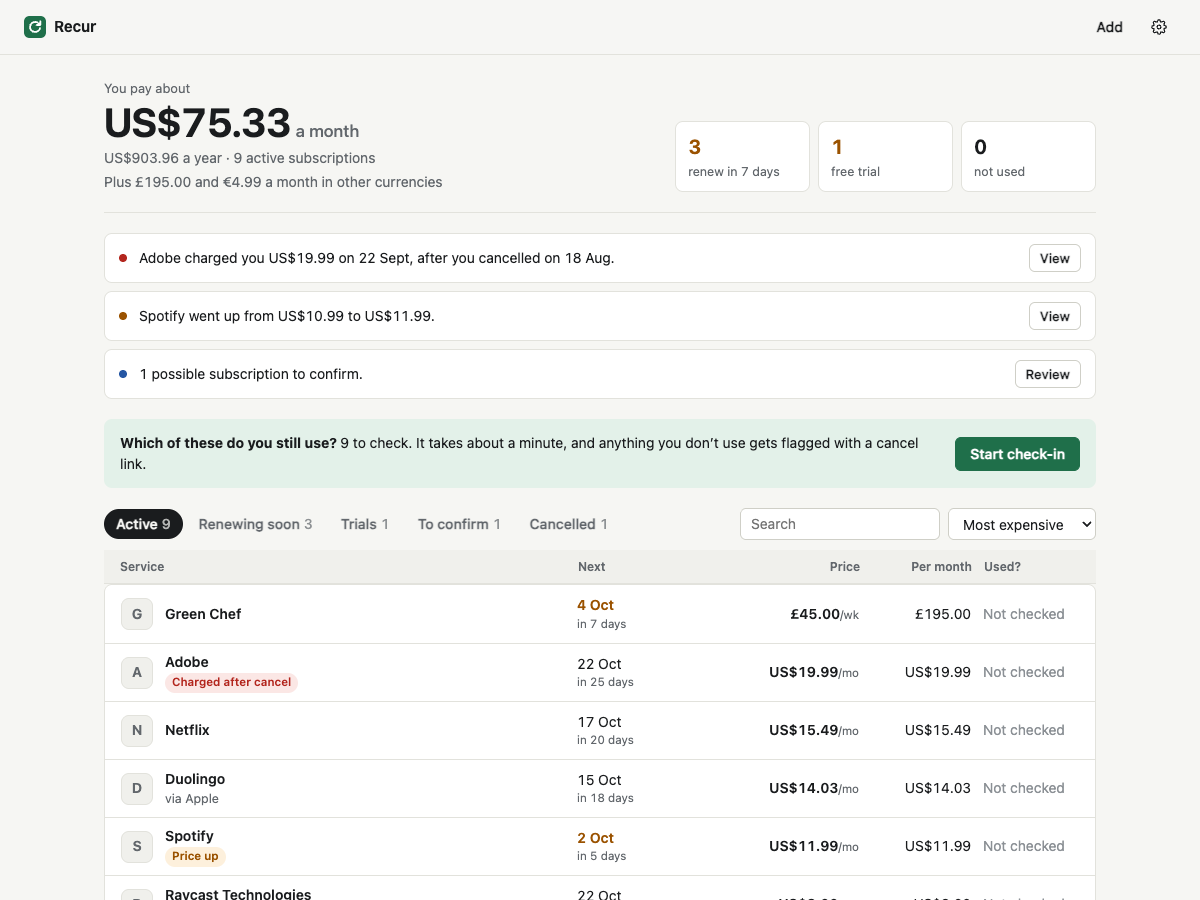
Your charges come from everywhere, so nothing adds them up.
Some services bill you directly, some apps bill through Apple or Google Play, indie tools use Stripe, and there’s a PayPal agreement you set up two years ago. Each sends its receipt to a different corner of your inbox, and the ones you forgot about keep charging.
- Netflix, Spotify, Adobe, GitHub…billed directly
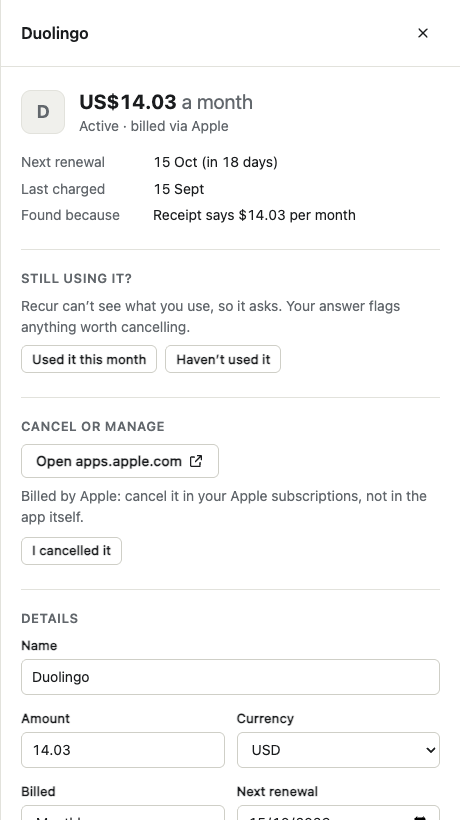
- Duolingo, Calm, iCloud+…via Apple or Google Play
- Small SaaS and indie appsvia Stripe, Paddle, Lemon Squeezy
- Hosting, VPNs, membershipsvia PayPal automatic payments
- Meal kits, gyms, newslettersany regular receipt
How it works
Setup takes a couple of minutes. After that, Recur checks for new receipts on its own.
- Connect your email
Use an app password for Gmail, iCloud, Yahoo, Fastmail or any IMAP server. Or import an .mbox export, or a bank statement CSV, and skip passwords entirely.
- Recur finds the receipts
It searches the last 13 months for receipts, invoices, trial and renewal emails, and downloads only those.
- You get one list
Repeated charges are grouped, billing periods worked out, and the next renewal date predicted.
- Cancel what you don’t use
A one-minute check-in asks what you still use and gives you the cancel link for everything else.
What Recur watches for
The things that actually cost you money.
- Renewals this week
What’s about to charge you and how much, so nothing renews by surprise.
- Free trials
When each trial ends and what it will cost afterwards.
- Price increases
When a plan goes from $10.99 to $11.99, you’ll see the old price next to the new one.
- Charged after cancelling
If a service bills you after you cancelled, Recur flags it so you can ask for a refund.
- Things that quietly stopped
An expected charge that never came usually means it ended, or it’s billing a different email.
- Calendar reminders
Export renewals to any calendar app, with a reminder two days before each one.
Your receipts say a lot about you. They stay with you.
Recur isn’t a website with your inbox behind it. It’s a small program that runs on your computer, and the page it shows only works on that machine.
- Email is read on your computer. Recur connects to your own mail server, encrypted, and to nothing else unless you turn on backup.
- Recur keeps just the facts from each receipt: sender, subject, date and amount. The emails themselves aren’t stored.
- Your app password goes in the macOS Keychain (or the system keyring on Linux), never in a file. Or keep it only until you quit.
- No account needed, no ads, no tracking. Anonymous usage stats are off unless you switch them on.
- Optional encrypted backup: your list is encrypted on your computer with your passphrase before upload, so a new computer can restore it. The backup server can’t read it. Your emails and passwords are never part of it.
- Recur never logs in to your services or cancels anything for you. It shows you where to cancel.
- One button deletes everything Recur has stored.
What it can’t do (yet)
- It can’t tell whether you use a service, so it asks you once a month.
- Outlook.com and Hotmail block app-password access, so they connect through Sign in with Microsoft instead.
- It only knows about charges whose receipts reach the inbox you connect.
- Totals are shown per currency, with no exchange-rate conversion.
Questions
Why an app password instead of “Sign in with Google”?
Sign-in with Google for Gmail needs an app that has passed Google’s security review, which Recur hasn’t done yet. An app password lets Recur talk to Gmail directly from your computer, with nothing in between. It only allows mail access, and you can revoke it any time in your Google account.
How does Recur know something is a subscription?
It looks for repeated charges from the same merchant at regular intervals, and for wording like “renews”, “per month” or “membership”. Every entry says why it was found, and you can correct it, confirm it, or hide it.
What if it misses one?
Add it by hand in a few seconds. Manual entries roll their renewal date forward automatically.
Does it work for apps bought on my iPhone?
Yes, if the Apple receipts go to the inbox you connect. Recur reads the app name out of Apple’s receipt and links to your Apple subscriptions page, which is where those get cancelled.
Can it cancel subscriptions for me?
No, on purpose. That would mean giving it your passwords for every service. It gives you the direct cancel or manage link instead.
What if I lose my computer?
Turn on Back up & sync in Settings. Your list, edits and check-ins are encrypted on your computer with a passphrase only you know, then kept on a backup server that can’t read them. On a new computer, sign in with the same email and passphrase to restore everything. If you forget the passphrase and lose the recovery key, the backup can’t be recovered. There is no reset.
How do I remove everything?
Settings → Delete all Recur data removes the database and the saved password. Then revoke the app password with your email provider and delete the Recur folder.
Get Recur
Recur runs on macOS, Windows and Linux. Get the desktop app, or run it from source with Node.js 22.13 or newer:
cd recur
npm install
npm start
Your browser opens the app at a private address on your own computer. Run npm start again any time to reopen it.